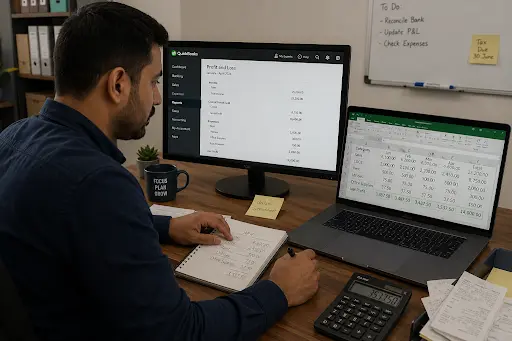
Think about a bookkeeper in Long Island City. She runs her own practice. Every Friday, she does the same three things. She pulls numbers from her accounting software. She retypes them into spreadsheets for each client. Then she checks her own work twice. Retyping numbers is exactly where mistakes happen. That’s almost three hours a week she’s not billing for. Three hours she’s not getting back.
Now picture every small business in the city doing some version of this. They copy data between tools that should already talk to each other. They retype the same information into a second system. Nobody ever connected the two. That’s the gap workflow automation services close. It’s not about robots on a factory floor. It’s about taking the boring, repeated part of a job off someone’s plate, so people get their Friday afternoons back.
What workflow automation services do
Workflow automation services connect the tools a business already uses. The CRM. The invoicing software. The inbox. The booking app. Information moves between them on its own. Nobody has to copy and paste it by hand. A provider usually starts by writing down how a task happens today, step by step. Then they look for the spots where a person is just moving data around, not making a real choice.
Deciding if a client deserves a discount, or how to calm down an upset customer, still needs a real person. It’s the steps in between that get automated instead. A new lead fills out a form. Instead of someone adding them to a spreadsheet by hand, the system adds them and sends a welcome email right away. Both things happen the second the form is submitted. An invoice gets approved, and the accounting software updates its own status. Nobody has to log in and change it by hand.
This isn’t only for big companies with an IT team. A five-person agency can use it too. So can a solo consultant. Most of the automations that save the most time are simple. They look obvious once someone writes them out on a whiteboard. A missing step here. A spreadsheet doing the same job as another tool. An email typed out fresh every week, even though it hasn’t changed in months.
There’s a quieter benefit too. It never shows up in a sales pitch: consistency. A person doing the same task fifty times a week will eventually skip a step. They might forget to copy someone, or send the wrong file. Software doing that same task fifty times does it the same way every time. That’s not exciting. But it’s the difference between a client who notices things slipping through the cracks, and one who never has a reason to.
The tasks worth automating first
Not every task is worth automating. A good provider will tell you that upfront. They won’t try to automate everything at once. The best tasks to automate share a few things. They happen often. They follow the same steps every time. And getting them wrong is either costly or just embarrassing.
A few examples come up again and again. A design studio in Bushwick might lose an hour every Monday sending the same project update to five clients, one email at a time. That’s a task built for automation. A contractor in Sunset Park chasing signatures on estimates loses days, not hours, to a slow process. That process could run itself the moment a client opens an email. A small shop in SoHo moves online orders into a spreadsheet by hand. One typo, and the wrong item ships to the wrong person. That mistake costs far more than the automation would have.
Most businesses make the same mistake. They start with the hardest process instead of the most repeated one. Automating a messy workflow just moves the mess faster. Now it breaks at machine speed instead of human speed. Try this instead: pick the task already done the exact same way every time. Prove the automation works there first. Then move on to anything more complicated.
It’s also worth admitting which tasks aren’t worth touching yet. A process that happens twice a month doesn’t pay back the setup time, no matter how annoying it feels in the moment. Same goes for a task that changes its steps every time, depending on the client. Automation rewards repetition. If a process doesn’t repeat, put that energy somewhere else.
This is the question people ask first. Somehow it gets answered last. So here it is, up front. A simple automation connecting two tools can cost a few hundred dollars to set up think syncing a new lead from a website into an email list. It can cost less if someone builds it themselves on a free plan. A bigger system touching four or five platforms costs more. Add conditional logic, approval steps, or error handling, and it usually runs between two and ten thousand dollars to build. Plus a small monthly fee for monitoring and fixes, since something on one end will eventually change.
That second number tends to catch people off guard. Fair enough it sounds like a lot for what looks, from the outside, like “just connecting some apps.” But the cost isn’t really for the connection itself. It’s for someone sitting down and writing out how the business really runs. It’s for catching the small problems that would otherwise quietly break the automation a few weeks after launch. And it’s for being around to fix it when something on one end changes without warning.
Most small businesses see a return within sixty to ninety days, because the time savings start the moment the automation goes live, and the setup cost is mostly one-time. So the math tends to work out faster than people expect going in. Say a process eats five hours a week. If someone’s getting paid a normal wage to do it, that time adds up fast.
A few things push the price up or down. The number of decisions built into the workflow matters more than the number of tools involved. A simple, straight-line process touching four apps is often cheaper than a two-app process full of exceptions. Clean data matters too. A business with tidy, consistent records gets a faster, cheaper build. One where the same customer shows up under three different spellings across two spreadsheets and an inbox does not.
A lot of what gets sold as “AI automation” today is really old news. It’s the same trigger-and-action logic that’s existed for over a decade, just wearing a new label. That’s not a knock that older logic still does most of the heavy lifting. But there’s a real difference worth understanding before paying extra for it.
Traditional automation is rigid: if X happens, do Y, every time, with zero judgment involved. AI changes that. It takes on the parts of a task that used to need a person to read something and figure out what it meant. A customer email comes in. Emails get scanned for tone and urgency, then sent to whoever should handle them or answered on the spot if it’s one of those questions that comes in constantly. A messy form gets cleaned up and matched to the right record. It doesn’t bounce just because a field didn’t line up exactly.
This matters most for customer-facing work. Every interaction used to need a human glance before it could move forward. It’s also the easiest place to overdo it. A booking confirmation can be fully automated, and nobody will mind. A complaint from a longtime client probably shouldn’t be. The Small Business Administration’s guidance on AI (sba.gov) makes a similar point: it’s a tool for handling volume and routine decisions, not a replacement for real human judgment.
Choosing a workflow automation provider in New York
Here’s a question to skip when vetting a provider: how many integrations does their platform support? That number always looks more impressive in a sales deck than it ends up being in practice. Ask better questions instead.
Do they start by writing down how the business actually works, before talking about which tool to use? Maybe the first meeting jumps straight to a tool recommendation. Nobody asks how the current invoicing process actually runs. That’s a warning sign. Anyone who picks a tool before understanding the workflow tends to build something that looks great in a demo. Then it falls apart the first time a client does something unexpected.
Do they understand small business operations, not just automation software in general? Someone who’s mostly built systems for big companies may think differently about a tight budget. They may not think about a three-person team, or what happens when the one person who understood the workflow goes on vacation.
And what happens after launch? Automation isn’t a project that gets finished and forgotten. APIs change. Tools get bought out and rebuilt overnight. Data formats shift without warning. Ask what ongoing support actually looks like. Push for real specifics, not a vague promise to stay in touch. A New York-based provider has one real edge here: same time zone, same business hours, a much shorter wait when something breaks on a Tuesday morning right before a client deadline.
Pricing honesty is worth checking too. A provider should be able to walk through roughly what a build will cost before any work starts, and explain why. That kind of provider is usually easier to trust than one who needs a multi-week “discovery phase” just to give you a number. Planning a small business automation shouldn’t take longer than building it.
Conclusion
Maybe you’re convinced this is worth doing but don’t know where to start. Don’t begin with a six-month roadmap. Start with one task.
Pick the process already done the exact same way every time onboarding a new client, sending a weekly status update, moving a paid invoice into the accounting software. Automate just that one thing. Write down how it currently works before touching any software, even if that’s three lines on a sticky note. It’s hard to fix a process nobody has actually looked at closely.
From there, either build it yourself if it’s simple enough for a free tool, or bring in someone local. Let them see how the business actually runs day to day. Have them build something that fits it, instead of forcing the workflow to match a generic template. Either way, the goal for month one isn’t a fully automated business. It’s one less thing on the Friday afternoon to-do list. It’s proof the approach works, and a clear idea of what to automate next. After that, most businesses keep going on their own, one process and one tool at a time.Want help figuring out which of your own Friday-afternoon tasks is worth automating first? Get in touch or see how we approach AI automation for small businesses across the city: https://aiautomationnyc.com/
Frequently asked questions
Do I need to know how to code to use workflow automation services?
Not really. Zapier, Make, and n8n are built around drag-and-drop you’re connecting blocks, not writing scripts. Where it gets technical is conditional logic or custom API calls. That’s when having a developer around matters. The basic stuff doesn’t require any of that.
How much do workflow automation services cost for a small business?
A simple two-app setup runs a few hundred dollars. Once you’re looking at several integrations with steps in between, you’re probably in the two-to-ten thousand dollar range upfront, plus a monthly fee to keep it maintained.
How long does it take to see a return on workflow automation?
Sixty to ninety days is typical. The setup is a one-time cost, and the savings start as soon as it’s live so the math usually works out faster than people expect.
Which workflow automation tool is best for a small business?
Depends. Zapier is the easiest place to start if you just need two apps talking to each other. Make handles messier, more complex flows. n8n is worth looking at if you want more control or think you might self-host at some point.
Should I automate a process that’s currently disorganized?
Not yet. Automation makes a broken process run faster it doesn’t fix it. Get the process working the way it should first, then automate it once it’s stable.
Related Posts

Lead Qualification Automation: The Complete 2026 Guide for Sales Teams
Picture this. A sales rep spends all Tuesday going through 40 forms. By the end of the day, only three are worth a call. The other 37 have the wrong budget. Or they're not a…

Business Process Automation in NYC: The Real Reason Companies Are Scaling Faster
There's a logistics company out in Long Island City that used to blow three days a month just fixing invoices by hand. One guy. One spreadsheet. A ruined weekend every month like clockwork. Then they…

AI Automation for Small Businesses: A Real-World Guide (2026)
Most guides on AI automation are written for IT teams or developers. Not this one. If you run a small business freelance, local service, or small agency you probably don't have a tech person.…