Most guides on AI automation are written for IT teams or developers. Not this one. If you run a small business freelance, local service, or small agency you probably don’t have a tech person. You’ve got a full plate and not enough hours. Three questions actually matter: what does this do, can you set it up without a coder, and where do you even begin? That’s what these covers.
What AI Automation Actually Is
Plain automation has been around since the 90s. You set a rule: when X happens, do Y. Email goes out after someone fills in a form. Invoice sends on the 1st. Reminder fires three days out. No thinking, just cause and effect. The AI part changes what “X” and “Y” can mean.
Without AI, the system only works if the input is clean and predictable. Change the format, miss a field, phrase something differently it breaks. With AI, the system reads what came in and figures out what to do with it. An incoming email gets scanned: is this a billing question or an angry customer? A reply draft gets written from your past responses. An invoice shows up in a layout you’ve never seen before, and the right numbers still get pulled and filed.
That last part is what makes it actually useful for real businesses. Real data is messy. Clients don’t follow templates. People fill out forms in weird ways. Old-school automation falls over the moment something’s off. AI handles the mess.
Why Small Businesses Get More Out of This Than Big Ones
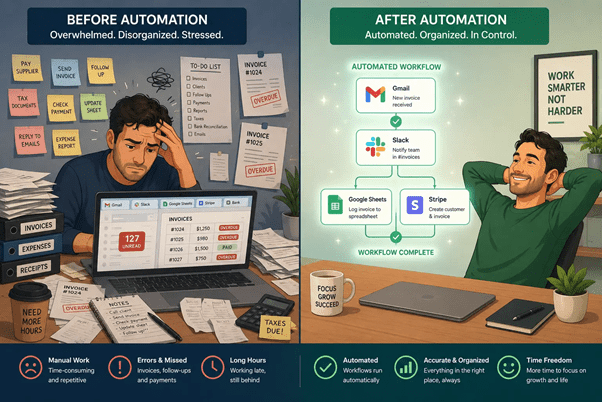
Big companies have whole teams for this stuff. “Revenue Operations.” “Business Systems.” People whose job, literally, is making sure workflows run. When something breaks, they fix it. When something’s slow, they optimize it. You don’t have that. When the admin work piles up, it falls on whoever’s already doing everything else. That’s usually just you.
Here’s the part people don’t talk about enough: it’s not just the time these tasks eat. It’s that they sit in your head. The follow-up email you keep forgetting. The weekly report you’ve been meaning to put together. The invoice you know is overdue but haven’t chased yet. That background noise doesn’t go away until the task is done or until something else handles it.A few real examples of what this looks like:
A freelance designer I know was spending about 20 minutes every time a new inquiry came in. Copy the email into her CRM. Write a reply. Add the lead to a spreadsheet. Now a Zapier workflow does all three the second the form gets submitted. She gets a Slack ping, the prospect already has a reply in their inbox, and she didn’t touch any of it.
A restaurant owner in Astoria used to send his reservation summary to the team WhatsApp group every morning by hand. Now a workflow does it at 8 a.m. He doesn’t think about it anymore.
A three-person agency built a report that pulls their client metrics from Google Ads, Meta, and Analytics every Monday and drops a formatted summary into Slack. Four hours to set up. Runs every week without anyone touching it.No developers. A few hours of setup. That’s it.
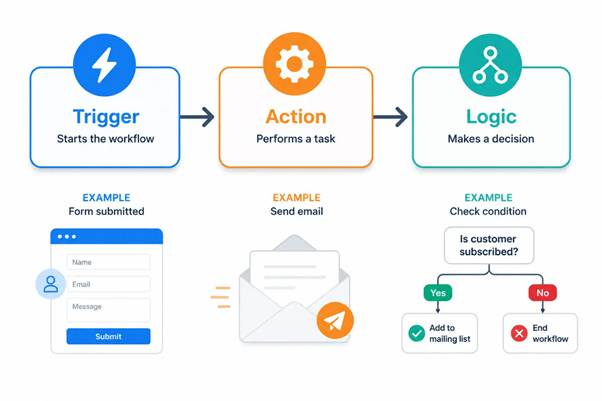
The Three Parts Every Automation Has
Once you understand these, you can build pretty much anything.
Triggers
A trigger starts the workflow. Nothing runs until one fire. Common ones: a form gets submitted, an email arrives, a new row lands in a Google Sheet, a Stripe payment clears, a specific time hits, someone posts in Slack.
One thing worth knowing early: your trigger decides what data you have to work with downstream. A form gives you whatever fields you put on it. A Stripe payment gives you the customer’s name, amount, and product. Pick your trigger before you design anything else.
Actions
An action is what happens after the trigger fires. Most workflows chain several together. Usual suspects: send an email or text, create or update a CRM record, add a spreadsheet row, post to Slack, generate a document, ping a team member.
They run in order. Output from step one flows into step two. That’s what makes multi-step setups worth building their compound.
Logic
Logic is optional but it’s what turns a basic automation into something smart. A logic step checks a condition and branches the workflow based on what it finds.
Example: your contact form has a budget field. The logic step reads it under $2,000, one email goes out; over $5,000, the lead gets flagged in your CRM and you get a personal ping. No manual sorting, no checking a spreadsheet.
When the input is unpredictable in small business, it almost always is AI that handles what a rigid rule can’t.
Tools That Are Actually Worth Using
There’s a lot of noise in this space. Here’s what people actually use.
Zapier
Zapier hooks up over 7,000 apps. Gmail, Google Sheets, HubSpot, Mailchimp, Calendly, Stripe, QuickBooks if you’re using it, Zapier almost certainly connects to it.
The builder is genuinely easy to use. Pick a trigger app, pick an action app, map the fields. A basic Zap takes maybe 15 minutes. Free plan is 100 tasks a month and 5 active Zaps plenty to find out if this is worth your time before spending anything.
One catch: the pricing gets steep fast once your volume grows. If you’re running dozens of automations at high frequency, the per-task model adds up. For most people starting out though, it’s the right first tool.
Make (was Integrate)
Make works differently. Instead of walking through steps one by one, you build on a visual canvas the whole workflow shows up as a connected diagram. Sounds more complicated, but honestly it’s easier to grasp what’s happening in a complex multi-step flow this way.
It’s also cheaper once you’re past the basics. Make bills by “operations” rather than tasks, so each run covers more for less money than Zapier. The free plan is 1,000 operations a month.
The trade-off is the learning curve. New users sometimes take an hour or two just getting comfortable with the canvas. If that sounds annoying, start with Zapier. If you’re planning to build something with real branching logic eventually, Make is worth the extra time upfront.
n8n
n8n is open-source and can run on your own server. That means your data doesn’t touch any third-party servers which matters if you work with sensitive client info or anything regulated.
It has a built-in AI workflow builder with connections to GPT-4 and Claude. For technically inclined users, it’s the most flexible option out there.
The self-hosting part takes some cloud infrastructure know-how. Railway and Render make it easier, but it’s still more work than signing up for Zapier. If that doesn’t sound like you, skip this one for now.
ChatGPT and Claude (via API)
Neither of these is an automation platform on their own, but both end up inside nearly every serious automation setup once you go beyond basic data routing. You connect them through Zapier or Make as action steps.
What you get out of it: drafted email replies, summarized email threads, structured data pulled from messy text, product descriptions, inbound requests sorted by type. Stuff that needs a bit of judgment, not just a data transfer. Setup is one action step: send a prompt, get a response back. Do it once and it’s easy to copy everywhere.
Where This Is Going
The current tools already handle most of what small businesses need. A few things coming next are worth keeping an eye on.
AI agents go beyond trigger-based workflows. Instead of waiting for something to happen and then following a script, agents take on open-ended tasks: research a prospect, draft a proposal, sort through a week of emails. Relevance AI is already in use by small teams. Still early, but moving fast.
Natural language workflow building is getting closer. Some platforms let you describe what you want and generate the workflow from that. Not quite reliable yet, but closer than a year ago. None of these needs waiting on. What’s available today is already useful.
FAQs
Nope. Zapier and Make were built for exactly this — people who’ve never touched code. You pick an app, connect it to another app, and tell it what to do. That’s basically it. If you’ve ever built a spreadsheet formula, you can handle this. Most first setups are done in under 20 minutes.
Old-school automation is stubborn. You give it one rule and it follows that rule — even when it shouldn’t. Something comes in the wrong format? It fails. A field is missing? It stops. AI automation is more flexible. It reads what’s there, figures out the intent, and keeps going. It can write a reply, sort a request, or pull data from a messy document without needing everything to be perfect first.
Zapier. Not because it’s the flashiest or cheapest — it’s not — but because it connects to the most apps and takes the least time to figure out. You can be running your first automation in an afternoon. Once you’ve got a few working and you want to do something more complex, that’s when Make starts making sense.
A basic one — say, sending a follow-up email when someone fills out your contact form — takes maybe 15 to 30 minutes the first time you do it. Something more involved, with conditions and branching steps, might take a few hours. Either way, you only build it once. After that it just runs.
Every run gets logged. When something fails, the platform shows you exactly which step broke and why. Turn on error notifications — both Zapier and Make can email or ping you the moment a workflow stops working. Check your logs once a week for the first month or so. After that you’ll have a feel for what’s reliable and what needs watching.
No — and that’s not really the point. It takes over the stuff that didn’t need a person in the first place: sending confirmation emails, logging contacts, posting updates, generating routine reports. The work that needs actual thinking — handling a tricky client, making a judgment call, building a relationship — that still needs a human. What changes is that your people spend less time on the boring stuff and more time on the work that actually moves the needle.
Conclusion
AI automation isn’t a big tech project. It’s one workflow. Pick the task that slows you down the most, the one you do by hand three times a week and keep meaning to fix. Set up a free account on Zapier or Make. Build that one thing. Let it run.
If it saves two hours, you now have two hours you didn’t have before. Then build the next one. That’s how small businesses actually get ahead with this. Not by overhauling everything at once. Just one workflow at a time, until the busywork mostly runs itself. Ready to stop doing the same tasks by hand every week?
Get your first automation running today → aiautomationnyc.com
Related Posts

Business Process Automation in NYC: The Real Reason Companies Are Scaling Faster
There's a logistics company out in Long Island City that used to blow three days a month just fixing invoices by hand. One guy. One spreadsheet. A ruined weekend every month like clockwork. Then they…

Lead Qualification Automation: The Complete 2026 Guide for Sales Teams
Picture this. A sales rep spends all Tuesday going through 40 forms. By the end of the day, only three are worth a call. The other 37 have the wrong budget. Or they're not a…

AI Automation for Healthcare Practices: A Simple Guide
It's 8:05 a.m. The phone's already ringing. A patient wants to move an appointment. Another needs a form. The front desk is juggling both, plus the person standing at the counter. Busy offices feel like…